
This guide is for founders who get inconsistent results from LinkedIn outbound and will help them learn how to make LinkedIn produce pipeline on a schedule, from profile to ads.
The Foundation of Profile and Presence Before Any Outreach Goes Out
The Sender’s Profile
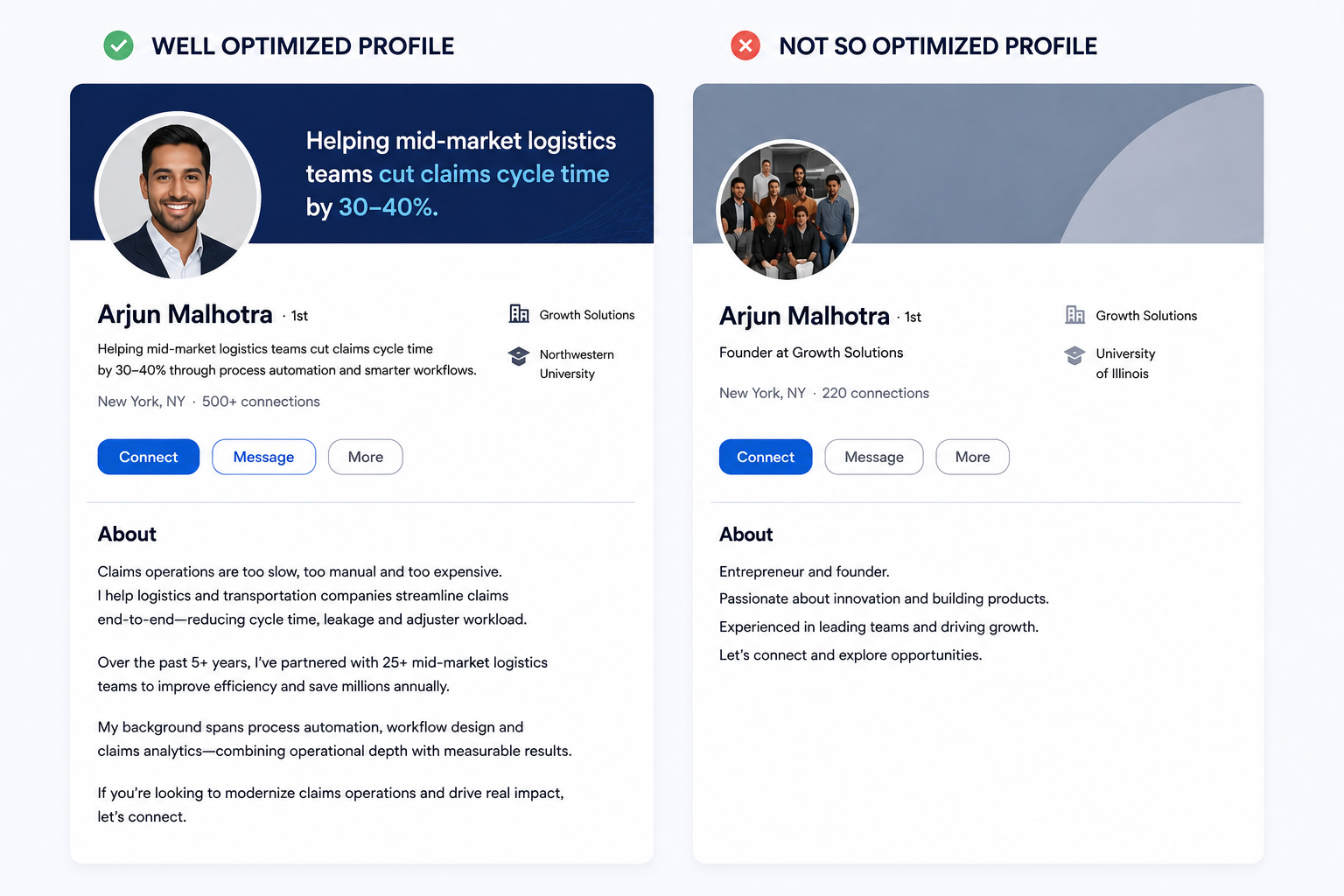
A prospect checks your profile once your request lands. That glance sets your acceptance rate.
Fix these things first:
The photo signals a real person. Use a clear headshot with your face filling most of the frame, good light and a plain background. Skip logos, group shots and anything taken in the dark.
The headline states who you help and the outcome you drive. “Founder at X” wastes the line. “Helping mid-market logistics teams cut claims cycle time” tells a prospect why connecting is worth it. One clear line beats a crowded one. Cut the keyword stuffing and the three stacked value props. They read like a billboard.
A formula that holds up: the outcome you drive, for the people you serve. Fill both halves with words your buyer would use and the line does its job.
Position by seniority: when you sell to VPs and founders, your headline and About section should read like a peer who solves an expensive problem. When you sell to managers and practitioners, lead with the practical result they own. The same profile does not land the same way across levels so write for the person you send the most requests to.
The About section opens with the problem you solve in plain language, then shows proof. Specifics earn the click.
The Sender’s Activity on LinkedIn
An active sender gets accepted more. A prospect who has seen you post or comment recognizes the name when your request arrives, and recognition lifts acceptance.
In our campaigns at Aihiom, senders who post and comment on a regular cadence hold higher acceptance than dormant profiles running the same list.
You do not need to be a content machine. One or two posts a week and a few comments a day on your ICP’s posts keep you visible. That steady presence is what turns acceptance from a weekly gamble into a rate you can count on.
The Company Page
Prospects click through to your company page too. The minimum for outbound is a real logo, a banner, a one-line tagline that says what you do and for whom, a filled-out About section and a few recent posts. That covers most of the trust lift.
LinkedIn sells a Premium Company Page on top of the free one. It adds a custom call-to-action button, a testimonials block, competitor benchmarking and auto-invite credits. Those are vendor features worth testing later. For outbound, a free page done well does the work.
ICP
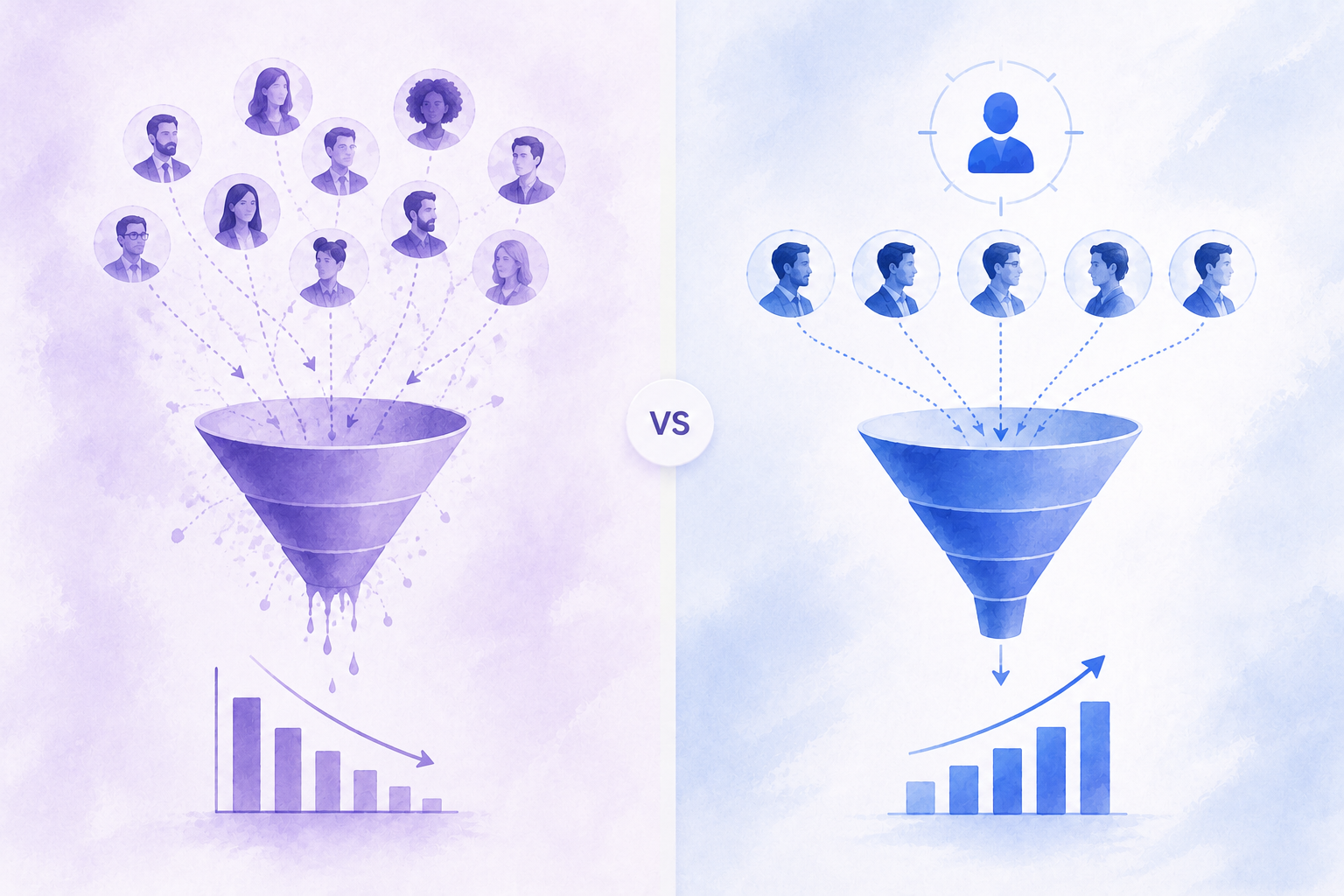
A loose ICP corrupts every other part of the system. Get it tight and the rest of the system has something clean to run on.
What a Loose ICP Costs You Across the Funnel
A vague ICP taxes you at every stage.
- Your lists fill with near-fits, so acceptance drops.
- Your copy speaks to no one in particular, so reply rate drops.
- Your ad budget reaches the wrong personas, so spend leaks.
- Your calendar fills with meetings that never convert, which looks like a channel problem when the root is a definition problem.
One loose input, four broken outputs.
How to Define ICP for LinkedIn Specifically
Define your ICP in the terms LinkedIn lets you act on. That means job title and function, seniority, company headcount, industry, geography and tenure in role. Add trigger filters where they fit, such as a recent job change, active hiring or a post about a problem you solve.
Write the ICP so a teammate could build the exact Sales Navigator search from it without asking a question.
A worked example makes it concrete. A tight LinkedIn ICP for a mid-market offer might read: heads of operations and VPs of operations, at logistics and freight companies with 200 to 1,000 employees, in the US and Canada, in role for at least six months, at companies that posted an operations or supply-chain hire in the last 90 days.
Every clause in that sentence is a Sales Navigator filter. You could build the search in five minutes and know exactly who lands in it. A definition you cannot turn into a search is a wish, not an ICP.
How the Outbound Engine Runs
Campaign Types Worth Running
Connection Request Sequences
You send a request then run a message sequence once it accepts. LinkedIn holds most accounts to about 100 connection requests per week, and that number resets on a rolling seven-day window.
Sales Navigator does not raise it, a point a lot of founders get wrong when they buy the plan. Mature accounts with a strong Social Selling Index can push toward 150 to 200 per week. Pace sends at 15 to 25 a day rather than firing them in one burst.
The cap is the reason you send steadily every day and across more than one sender instead of one big Monday push.
LinkedIn restricts accounts for aggressive automation, sudden volume spikes and acceptance rates under 30 percent. Warm a new or dormant account with a week or two of light activity before you ramp. Keep acceptance above 30 percent by tightening your targeting, and pace whatever tool you run. A frozen account halts every sequence you have running, and it can take weeks to earn the limits back.
InMail Campaigns
InMail reaches people without a connection and credits for that come with paid tiers.
Premium Business includes 15 InMail credits a month and Sales Navigator Core includes 50. A credit comes back if the recipient responds inside 90 days, including a decline or an auto-reply. So well-written InMails stretch your allocation.
The body caps at 1,900 characters and the subject at 200, and you cannot send a second InMail to the same person until they respond.
LinkedIn reports InMail response rates of 18 to 25 percent. Treat that as a vendor figure and measure your own. Save InMail for high-value targets you cannot reach fast enough through requests.
Multichannel (LinkedIn and Email Together)
Pair LinkedIn touches with email. A second channel raises reply rate and gives you a way to reach a prospect whose request is not accepted yet. When one channel goes quiet in a given week, the other carries the load. That is a large part of how the weekly swing flattens out.
We break the whole channel down in How B2B Startups Can Build an Outbound System in 2026.
Messaging at Each Stage of the Sequence
The Connection Request
Send it without a note. A blank request often accepts at a higher rate than a noted one, and the free tier limits noted requests to around five a month anyway. When you do add a note, name one specific use case or a real observation about their work. A pitch in the request line lowers acceptance.
The First Message After Connecting
Wait a human gap before the first message. A few hours to a day reads like a person. An instant message the second they accept reads like a script.
Then run a three-step opener:
- Reference why you connected or something specific about their work
- Add one line of relevance to their world
- Close with a soft question that starts a conversation
Do not pitch hard here and do not ask for the meeting yet. The whole message should read like outreach a person typed, with none of the stock AI phrasing that trains prospects to ignore you.
Here is the shape to adapt. Keep the structure and swap in your own specifics. Open with why you connected, tied to something real: “Saw your post on carrier onboarding last week, the bit on document chasing landed.” Add a line of relevance to their world: “We are in that exact bottleneck a lot with ops teams your size.” Close with a light question that invites a reply: “Curious how you handle it now, still manual or moved somewhere?” No pitch, no calendar link, no wall of text.
Three lines that read like a person sent them, sent a few hours after they accepted.
The Follow-Up Cadence
Space follow-ups by days not hours. Two to four follow-ups over two to three weeks is a solid range, and each one should change the angle rather than repeat the last. Automation tools have flooded inboxes with identical, AI-sounding sequences, so sameness is the fastest way to get skipped.
Give each follow-up its own reason to exist. One shares a relevant result or a short case. One asks a sharper question about their setup. One offers something useful with no ask attached, like a teardown or a benchmark. The last names that you will stop there and leaves the door open. Four touches, four angles, none of them a limp “circling back” nudge.
The Ask
Make the ask only after value has landed. Keep it low-friction. Give a specific reason to talk and offer a couple of time windows, or go lighter with a resource or a single question. One clear ask per message. A stacked ask splits attention and lowers the odds of any reply.
Tools That Run the Volume
A few tools cover the LinkedIn channel well. Keep the evaluation light and pick one.
- Lemlist runs multichannel sequences across LinkedIn, email and calls with personalization built in. Good for blended campaigns.
- Skylead runs smart LinkedIn and email sequences with if-then branching that routes a prospect by how they respond.
- HeyReach is built for agencies and teams. It runs many sender accounts from one place with a shared inbox.
- Expandi sends from the cloud with a dedicated IP per account and conditional sequences. An older tool with a track record on account safety.
- La Growth Machine covers LinkedIn, email and X in one sequence with enrichment in the flow.
LinkedIn Ads Running Alongside Outbound
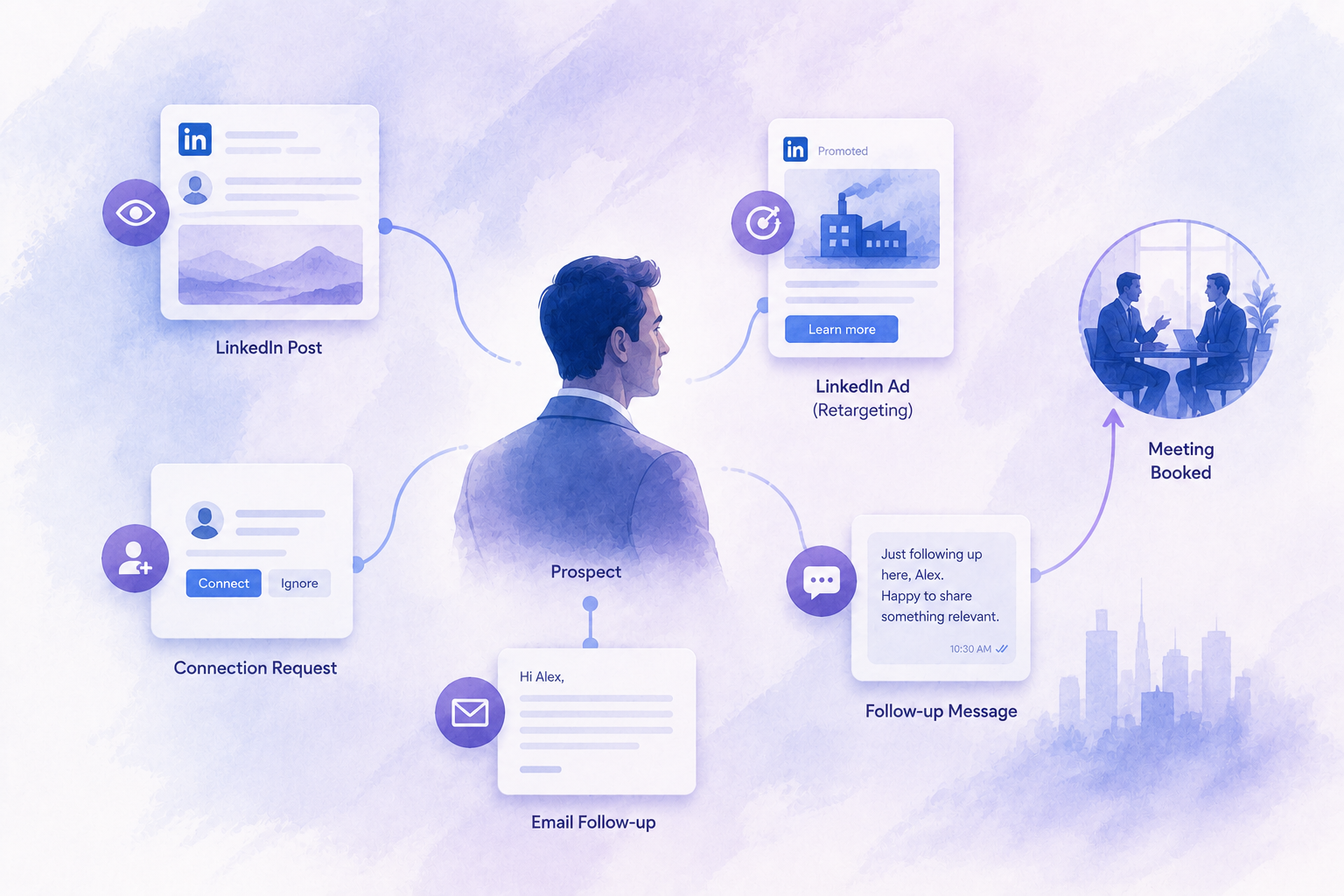
Ads make outbound land better by putting your brand in front of the same accounts before and between your touches.
What Happens When Ads and Outbound Target the Same List
Ads cannot target a named person. You target a persona built from job title, function, seniority, industry and company size, or you upload a company list as a matched audience. Point that targeting at the same segments your senders work. A prospect who saw your brand in the feed finds the name already familiar when the request lands. We see directional lift in acceptance and reply for accounts under ad cover.
Build the audience by exporting company names or contact emails from your Sales Navigator list and uploading those as a matched audience. Then keep both the ads and the senders pointed at it. The overlap is the whole point. Reach in the feed with no request attached, then the request, then more reach in the feed between your messages. The prospect never gets the outreach cold.
Retargeting the Outbound List
Upload your outbound contact or company list as a matched audience, then retarget those people plus anyone who visited your site.
One floor to know first: LinkedIn will not run a matched audience under 300 matched members, and match rates on an uploaded list run 30 to 70 percent, so you have to upload well over 300 to clear it.
Treat retargeting as a program-level play. Pool every sender’s list and your site visitors into one audience that grows over time rather than pointing ads at a single batch of 100. This keeps your brand present in the gaps between touches, which is where most sequences go cold. A prospect who sees one more useful post from you mid-sequence has you in mind when your follow-up lands.
Lead Gen Forms
Lead Gen Forms are native forms that prefill with a prospect’s LinkedIn profile data. Completion runs higher than sending someone to a landing page. Use them to capture the warm-but-not-ready audience your outbound surfaces, so a slow lead still enters your pipeline instead of dropping out of it.
Budget
Minimum viable spend. LinkedIn’s floor is 10 dollars a day per campaign. For real signal, plan a few thousand a month against a tight audience.
Which ad type first. Start with single-image sponsored content retargeting your outbound and site audience. Layer Lead Gen Forms in second.
What to measure. Skip click-through rate. Watch frequency, cost per lead and the lift in acceptance and reply for the accounts you hit with both ads and outbound.
How the Full System Connects
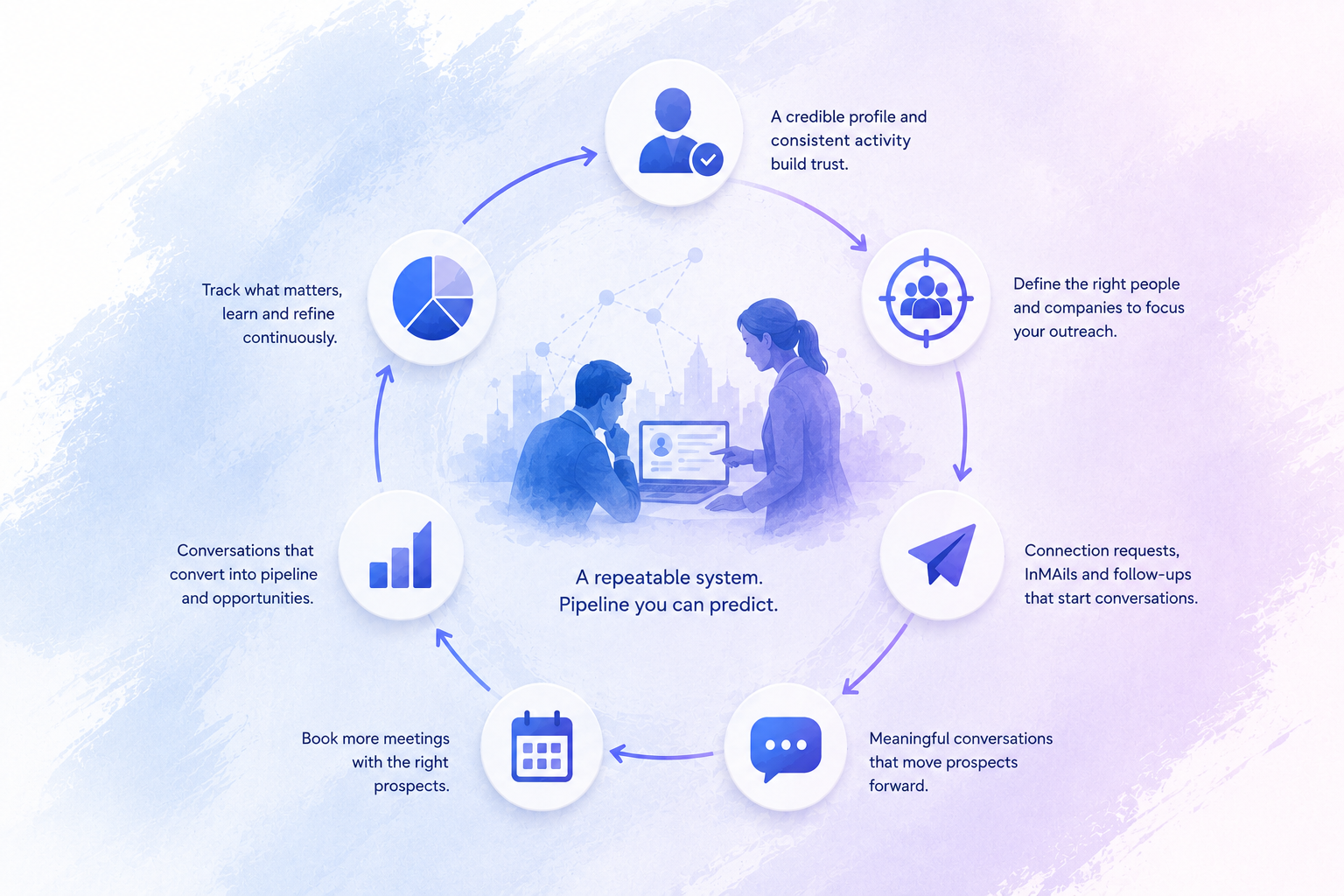
One mental model holds the whole thing together:
- The profile is the landing page every touch routes through
- The ICP decides who enters
- The sequences carry the conversation once someone is in
- The ads keep your brand in front so each touch lands warmer
- The metrics tell you which part to repair
Each part feeds the next.
A weak profile caps acceptance no matter how good your targeting is. A loose ICP wastes strong copy on the wrong people. Ads without a sharp ICP burn budget on personas that will never buy. Slow replies waste a sequence that worked. When every part holds, the system produces pipeline on a schedule. When one part slips, the whole channel goes back to swinging.
Run the parts in the order they depend on each other:
- Profile before volume
- ICP before copy
- Copy before ads
- Metrics are on top of all of it and point you at where the next hour of work belongs
Founders who skip to volume or ads first tend to spend months repairing a foundation they could have set in a week.
How to Read Your Campaign Metrics
Each metric points at one part of the system. Read the symptom, fix the right thing.
Low connection rate points at the profile and the ICP targeting. First ask whether your ICP is active on LinkedIn at all. IT analysts and sales leaders live on the platform. Some lawyers and trades do not, so a low rate can mean the audience is wrong for the channel rather than the request being weak. Give a batch time before you judge it. In our campaign data at Aihiom, 75 percent of the connection requests that ever get accepted are accepted inside the first week. So read a batch at the seven-day mark. A quiet first afternoon means nothing. As a rough read from our campaigns, a well-matched B2B segment tends to land a connection rate around 30 to 40 percent, and the strong ones clear that. Under 20 percent, look hard at the profile and the fit. Treat those as directional ranges from our work, not guarantees.
Low reply rate points at the messaging and your sender presence. Rework the first message, then check your profile and activity. A prospect who accepted but went silent often looked at a thin profile after the fact. A first message that reads human tends to pull replies in the 20 to 40 percent range in our campaigns. Well under that points back at the copy or the profile behind it.
Meetings not converting points at ICP quality and pitch framing. Two things move this. Tighten who you let into the funnel, and sharpen how you frame the offer on the call. Reply turnaround belongs here too. How fast you answer an incoming message, and how you answer it, shapes whether a reply becomes a meeting. A warm prospect who waits a day for your reply cools off.
Where to Start
Fix the profile first. It is the highest-leverage move at the start, and every request and message you send from here runs through it.
Then run the sequence in order. Buy the sending tool, build one narrow list in Sales Navigator, warm the account with a week of light activity and start sending at a steady daily pace.
One action this week: pick one segment, rewrite your headline and About section, load 100 prospects and send 20 a day with a clean first-message sequence behind them.
If you would rather not build and run this yourself, that is what we do.
Let’s talk