B2B startups running outbound keep hitting the same wall. Emails go out in batches when someone has time. Follow-ups get forgotten. LinkedIn and email run as separate, unconnected motions. There is no consistent daily process, no clear picture of who is being targeted, and no way to know what is actually working.
The result is a pipeline that is thin and unpredictable.
This guide walks through how to fix that, whether you are a founder doing your own selling, a solo sales rep, or a two-to-three person team. A properly built outbound system takes 60 to 90 days to show consistent results. Most teams quit at week three, before the data means anything.
Step One: Figure Out Exactly Who You Are Selling To
Your ideal customer profile is a specific set of characteristics that tell you whether someone will buy, get results, and stay. Look at your existing customers or your best sales conversations and ask what they have in common.
If you are pre-10 customers, your sales conversations matter more than your customer list. Use the ones that moved fastest or felt most natural, and treat your ICP as a hypothesis you are testing, not a conclusion. It will change once you have more data.
What a Useful Customer Profile Answers
- How big is the company in headcount and revenue?
- What industry are they in?
- Where are they based?
- What tools do they already use?
- Who is the buyer, and what is their job title?
- What is happening at their company right now that makes them more likely to buy?
That last question is the one teams skip. A 200-person SaaS company is too broad to be useful. A 200-person SaaS company that just raised a Series B and is hiring its first Head of Sales is a buying signal. Same company, two different situations, two very different conversations.
Finding signals at scale: LinkedIn job postings show which companies are actively hiring for roles that signal buying intent. Crunchbase and Tracxn surface funding announcements in real time. Google Alerts set up for target companies will catch news, product launches and leadership changes. Clay can automate all of this without a research team.
For B2B teams in 2026, the answer on channels is email and LinkedIn. The balance depends on your buyer. If you are targeting senior executives at larger companies, LinkedIn messages will get more replies than cold email. If you are targeting business owners or technical buyers who are not active on LinkedIn, email plus phone calls is the better combination.
A Simple Starting Sequence
Plan your outreach sequence before you start building your list. What matters first is that it exists and runs on schedule.
- Day 1: LinkedIn connection request
- Day 3: First cold email with a clear opening line, one reason you are reaching out, one ask
- Day 7: LinkedIn message, short, references the email
- Day 10: Follow-up email
- Day 14: Final email, wrap it up or leave the door open
How to Keep Volume Consistent
When outreach volume drops, your pipeline drops 30 days later. The fix is a written daily routine that makes consistent outreach the default.
Automate everything except the replies. Tools like Lemlist, Instantly and Smartlead run sequences automatically. Emails send on schedule, follow-ups go out on time, and LinkedIn touches queue without anyone managing them day to day. The only task that needs a human is reading replies and responding.
Set aside 30 to 60 minutes every day to review what is working, refresh your lead list and adjust anything underperforming. That is the operating rhythm for a team running a healthy outbound motion.
What to Review Daily and Weekly
Each day, check which emails are getting replies, which steps in your sequence are falling flat, and which types of prospects are responding. Each week, go deeper by checking reply rates by sequence step, prospect type and subject line.
After the first month, ask:
- Which ICP segments are producing the fewest replies?
- Is it a targeting problem (wrong companies or titles) or a messaging problem (the right people not responding to what you are saying)?
These are two different fixes. Bad targeting means changing who is on your list. Weak messaging means rewriting the emails. Conflating the two is how teams end up rebuilding their whole sequence when they just needed a better subject line.
Keep Your Tool Stack Simple
B2B outbound teams run well on two core tools:
- Prospecting and outreach in one platform: The biggest mistake is running LinkedIn and email through separate tools. Use one that handles both. Lemlist, Skylead, Waalaxy, HeyReach and MeetAlfred all run LinkedIn and email sequences from a single dashboard, which means no duplication, no manual syncing and one place to track replies.
- Lead data and enrichment: Apollo.io and Lusha both give you contact data with built-in verification. Apollo has more depth for company research. Lusha is faster for individual contact lookup. Pick one and stay consistent.
A CRM is not a priority before you have a repeatable process. A shared spreadsheet or the built-in tracking inside your outreach tool is enough until you are booking calls consistently.
How to Set Up Your Cold Email Infrastructure
Cold email setup is where most teams cut corners and pay for it later. Getting the infrastructure right before your first send is what separates teams that build consistent pipeline from teams that burn their domains and start over.
Never send cold email from your main business domain. If outreach from yourcompany.com gets flagged for spam, it can damage your ability to send any email at all, including receipts, invoices and internal messages. Always use separate sending domains. Register close variations of your main domain: if your company is acme.com, use getacme.com, tryacme.com or acmehq.com. These cost a few dollars a year and fully protect your primary domain.
Plan for one domain for every five to seven sending email addresses. If you need to send 500 emails a day, that means roughly 10 to 12 email addresses across two to three domains. Before your first send, run every contact through a verification tool. Apollo and Lemlist both have built-in verification. Unverified lists will contain bad addresses that damage your domain before your first campaign is finished.
Set Up SPF, DKIM and DMARC on Every Sending Domain
These three DNS settings tell Gmail and Outlook your emails are legitimate. Google and Microsoft now block or reject emails from domains missing any of them. Here is what each one does:
- SPF tells email providers which services are allowed to send on behalf of your domain.
- DKIM adds a digital stamp to each email so the receiving server can confirm it came from you and was not changed in transit.
- DMARC tells receiving servers what to do with emails that fail SPF or DKIM checks, and sends you a report so you can monitor what is happening.
Setting all three up takes about 30 minutes per domain through your DNS provider. Verify they are working by checking the headers of a test email. You should see spf=pass, dkim=pass and dmarc=pass.
Warm Up Every New Inbox Before Sending
Warm up each inbox for at least 14 to 21 days before sending any cold outreach. A new address with no sending history looks suspicious to email providers and will land in spam. The tools already mentioned have warming built in. Lemlist includes Lemwarm. Instantly and Smartlead both have native warming features. If your tool does not include warming, Mailreach is a reliable standalone option.
Start at 10 emails per inbox per day and increase by two each day until you reach 40. Do not push past it. If you need more volume, add inboxes rather than pushing existing ones harder.
Deliverability benchmarks to watch: A bounce rate above 2% or a spam complaint rate above 0.1% means your data needs cleaning before you send another email. Run your list through your outreach tool’s built-in verification before every send. Your sending platform will surface both numbers directly.
How to Run LinkedIn and Email Together
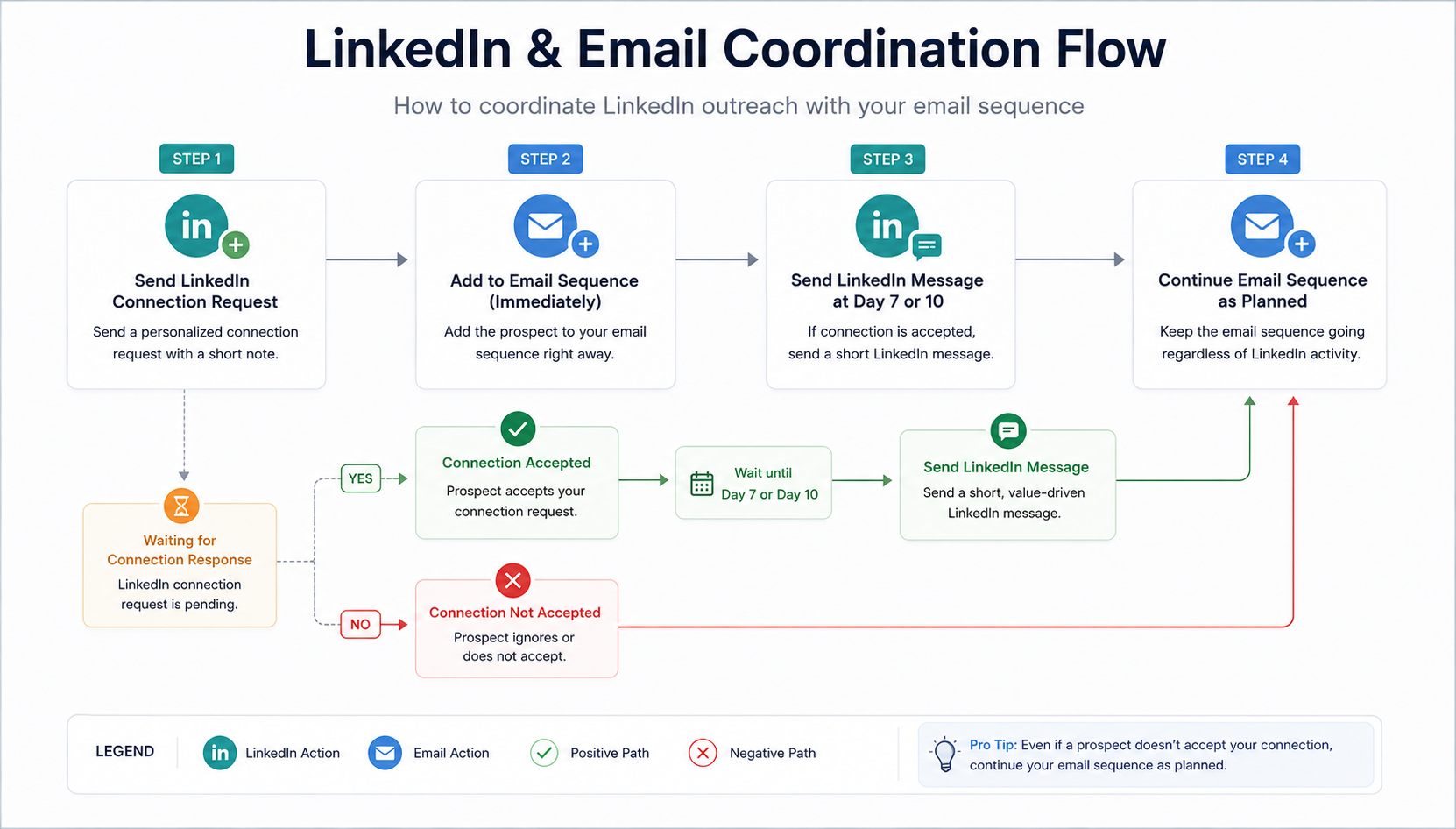
Run LinkedIn and email as one coordinated system. Each channel makes the other more effective. LinkedIn touches happen before and between emails, and the sequence holds it all together.
A Simple Coordinated Setup
- Send the first email on Day 1
- Send a LinkedIn connection request on Day 2
- If they accept, wait 2 to 3 days then send a short LinkedIn message
- Wait 2 days after the LinkedIn message, then send your next email
- If your outreach tool supports it, add a profile visit or post like before the connection request to create familiarity before your request lands
If they do not accept the connection request, the email sequence continues on its own schedule.
What actually determines whether your connection request gets accepted: The note matters less than most guides suggest. What prospects see first is your profile, your photo, your headline and your current role. A clear, professional profile with a specific headline (“Helping SaaS teams build outbound systems” beats “B2B Sales | Growth | GTM”) will outperform a well-written note on a weak profile every time. 75% of connection requests that will ever be accepted are accepted within 7 days of sending.
Once someone connects, your LinkedIn message should be two to three lines. A clear reason you are reaching out and one direct question or ask. If you are following up on an email, something as simple as “Sent you a note last week about [topic], wanted to see if it landed” is enough.
If a prospect replies on either channel, your outreach tool should pause the rest of the sequence automatically. Lemlist handles this without manual intervention. If you are using a tool that does not, check replies every morning and pause sequences by hand.
2026 benchmark data: Cold email reply rates average 3.43% across all campaigns, with top-performing campaigns reaching 10% or higher. LinkedIn direct message reply rates run between 10 and 15% with good targeting and up to 39% on highly personalized messages, according to Overloop benchmark data. Teams running both channels together in a coordinated sequence report reply rates of 15 to 25% on tightly defined prospect lists.
How to Build a Multi-Channel Outreach Sequence
A well-built multi-channel sequence mixes emails, LinkedIn connection requests, LinkedIn messages, profile visits and calls. The exact order depends on your ICP and tool, but the logic is consistent: warm the prospect through LinkedIn first, follow up with email, then call anyone who has not responded after all touchpoints are exhausted.
Channel Timing Guidelines
- Email: Minimum 3-day gap, ideally 5 working days. Sending too fast signals automation and hurts reply rates.
- LinkedIn message: Minimum 3-day gap, ideally 4 to 5 days. Only after the connection is accepted.
- Call: Most effective when triggered by an email open or LinkedIn interaction. Aim within 2 to 4 working days of last outreach.
A Typical 14 to 21 Day Sequence
- Days 1 to 2: LinkedIn profile visit and connection request
- Day 3: First email, whether or not the connection request has been accepted
- 2 to 3 days after connection accepted: Short LinkedIn message
- 2 days after the LinkedIn message: Second email
- Between touchpoints: Profile visit or post like to stay visible, if your tool supports it
- Days 14 to 17: Final email and a call attempt for anyone who has not responded
Prospects who do not convert at the end of the sequence do not get dropped. Move them into a nurture campaign: lower frequency, lighter touch, one email per month with something relevant, a piece of content, a product update or a question tied to something happening in their industry.
What Makes a Cold Email Work
Every element of a cold email has a job to do. Most teams get one or two right and leave the rest to chance.
Subject Line
Keep it under 6 words and reference something specific to them: a hire, a funding round, a product launch. Avoid “Quick question,” “Following up” or anything with an exclamation mark. These pattern-match to spam before a human sees them.
Opening Line
Reference a real signal. A job posting, a recent announcement, something that shows you looked before writing. Do not open with what your company does. The prospect does not care yet.
Body and Call to Action
Connect the signal to a specific outcome you can help with. One problem and one result, two to three sentences maximum. Do not list features, attach a deck or explain your entire product in the first email.
For the call to action: ask for something small and specific. A 15-minute call on a specific day, or a yes/no question they can answer in one line. Do not ask for the big meeting in the first touch.
Follow-Up Emails
Add something new each time: a different angle, a relevant piece of content, a shorter and more direct ask. Do not say “Just following up on my last email.” It adds nothing and signals you have nothing new to say.
On using AI for outreach copy: AI tools can draft outreach messages in bulk by pulling from public data: LinkedIn profiles, job postings, funding announcements and company news. The risk is that when everyone uses the same tools with the same basic prompts, the messages look identical. The fix is a messaging style guide. Write down your tone, your sentence structure, the words you use and the words you avoid. Use it as a system prompt when you run AI drafts. The output will be closer to how you actually write and will need less editing before it goes out.
How to Use Cold Calling as Part of Your Sequence
Cold calling books meetings that email and LinkedIn miss, particularly with operations managers, field-based buyers and executives with aggressive spam filters. It is narrow in its use case, but in that use case it works.
When Calling Fits Best
- Short sales cycles where speed matters. A call can qualify or disqualify someone in five minutes.
- As a follow-up to an email open or link click. Calling right after someone engages increases the chance they will pick up.
- Late in a sequence. After multiple unanswered emails, a call breaks the pattern in a way another email cannot.
A Simple Script Structure
- Opening (10 seconds): “This is a cold call. Do you have 30 seconds?”
- Reference prior outreach (10 seconds): “I reached out on LinkedIn and sent a couple of emails last week. Did you get a chance to see any of those?”
- Value statement and discovery (20 to 30 seconds): “We help [type of company] with [specific result].” Adjust based on what they say.
- Book the call: “I can set up 15 minutes with our team. I have Thursday at 11am or Friday at 2pm. Which works?”
Prioritize warm dials first. A prospect who opened your email, clicked a link or accepted your LinkedIn request is a warmer conversation than a completely cold dial. Some outreach tools flag engaged prospects automatically. Work that list daily before calling anyone who has not interacted at all. For a lean team, a realistic daily call capacity is 20 to 40 dials per person.
How to Use WhatsApp for B2B Outreach
If more than 30% of your target market is based outside North America, WhatsApp belongs in your sequence from the start. If your market is primarily US or Canada-based, treat it as an optional add-on for prospects who ask for it.
WhatsApp response rates exceed 55%, compared to a 3 to 5% reply rate for cold email. There is no spam folder, and messages that arrive almost always get read. In markets like India, Brazil, Indonesia, Latin America, Southeast Asia and much of Europe, WhatsApp is how professionals communicate day to day.
Industries Where WhatsApp-First Outbound Makes Sense
- Logistics and supply chain, where WhatsApp is used across markets globally
- Construction and real estate in Latin America, the Middle East and Southeast Asia
- Manufacturing and trading companies in India, Brazil and Southeast Asia
- Any segment where contacts are primarily mobile-based and work in the field
Always get permission first. Meta’s Business Messaging Policy bans unsolicited promotional messages on WhatsApp globally. A practical way to get permission in a B2B outbound context is to run click-to-WhatsApp ads on LinkedIn or Meta, add a WhatsApp option to your website contact form, or include a line at the end of an initial cold email: “Do you use WhatsApp? Happy to continue there if it’s easier.” That last method works well for warming up a prospect who has already replied once.
Five Metrics to Track
Outbound only improves if you know what you are measuring. These five metrics tell you where the system is working and where it is not.
Reply Rate
Measures how many prospects respond to your outreach at all. Strong indicator of targeting quality and opening line effectiveness. Benchmark: 3 to 5% for cold email, 10 to 12% or higher for multi-channel sequences.
Positive Reply Rate
Tracks replies showing genuine interest, curiosity or intent to learn more. Helps validate ICP and messaging fit. Benchmark: 1 to 3% as a healthy starting baseline.
Calls Booked
The clearest indicator of outbound performance. Shows whether outreach is converting into pipeline opportunities. Track by channel source and look for consistent weekly growth rather than a fixed number.
Cost Per Call Booked
Measures efficiency by comparing tool spend, data costs and time investment against booked meetings. This number should decrease over time as targeting and messaging improve.
Call Show Rate
Indicates lead quality and qualification accuracy. Low show rates usually mean weak targeting or poor qualification earlier in the sequence. Benchmark: 70% or higher.
Ready to Build an Outbound System That Actually Works?
Aihiom builds and runs outbound systems for B2B startups. We handle infrastructure, sequencing, copy and reporting. Your team focuses on closing the calls we book.
Book a Call Learn MoreWhy Some B2B Startups Work With an Outbound Agency
Building outbound in-house has real costs that rarely show up in a spreadsheet. Understanding them helps you make a more informed decision about how to staff this function.
The Learning Curve
The first 60 to 90 days are mostly setup: infrastructure, tools, list building, testing what messaging works. That is two to three months before you have a repeatable process. Internal hires or founders doing this themselves take longer.
Tool Costs and Ramp Time
An outreach platform, data provider and calling tool runs $500 to $1,500 per month. A dedicated SDR takes 3 to 6 months to hit full productivity. A founder splitting time between outbound and everything else takes longer. During that window, pipeline is not building.
The cost that rarely gets counted: Every month without a working outbound system is revenue your business did not generate. When you factor in salary, tools, ramp time and missed pipeline, a 12-month agency engagement often costs less than an internal hire, and it starts producing results in weeks rather than months.
Building the System Is the Work
Outbound is not a campaign you run once. It is a system you build, measure and improve continuously. The teams that generate consistent pipeline are not doing more activity than everyone else. They have defined who they are targeting, set up their infrastructure properly, run coordinated sequences across channels and review their numbers every week.
Start with your ICP, get your email infrastructure right, pick one tool that runs LinkedIn and email together, and commit to the first 90 days. The data you collect in that window tells you everything you need to improve from there. If you would rather skip the setup and start generating pipeline now, Aihiom can help.